Kanban vs Gantt chart vs to-do list: which one fits your project?
One small project shown three ways, as a to-do list, a kanban board and a Gantt chart, so you can see which view fits the way you work.
A to-do list, a kanban board and a Gantt chart can all hold the same tasks. What changes is the question each one answers best.
- To-do list: what do I do next?
- Kanban board: where is everything right now?
- Gantt chart: when will it all be done, and what has to happen first?
The easiest way to see the difference is to take one project and show it all three ways.
The example project
Sam and Alex run a small online shop and are launching a new product line in six weeks. Here are their tasks, as of week 3:
| Task | Who | Weeks | Status |
|---|---|---|---|
| Choose the products | Sam | 1 | Done |
| Order samples | Sam | 1 to 2 | Done |
| Photograph the products | Alex | 2 to 3 | In progress |
| Write the descriptions | Sam | 3 to 4 | To do |
| Build the shop pages | Alex | 4 to 5 | Waiting (needs the photos) |
| Send the launch email | Sam | 6 | Backlog |
Six tasks, two people, one deadline. Now let's look at it three ways.
As a to-do list
Sam's list for this week is short:
- Write the descriptions
- Send the launch email (later)
Alex's is even shorter:
- Finish photographing the products
- Build the shop pages (after the photos)
This is the view that gets work done. It cuts out everything that isn't yours and tells you what's next. What it doesn't show is the whole project: Sam can't tell from this list that Alex is stuck until the photos are done, or whether week 6 is still realistic.
Best for: your own tasks, daily routines, and projects where order and timing don't really matter.
As a kanban board
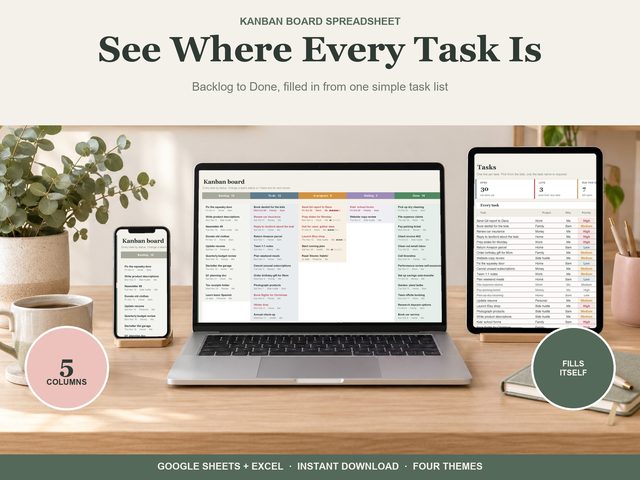
A kanban board puts every task on a card in a column by status, so the whole project is visible at once. With five columns:
| Backlog | To do | In progress | Waiting | Done |
|---|---|---|---|---|
| Send the launch email | Write the descriptions | Photograph the products | Build the shop pages | Choose the products |
| Order samples |
At a glance: two done, one in progress, and one stuck in Waiting. That Waiting column is the useful part. It shows that the shop pages can't move until the photos do, and that's the conversation Sam and Alex should be having this week.
Best for: ongoing work with a steady flow of tasks, small teams, and spotting bottlenecks. It shows the state of things, not the dates.
As a Gantt chart
A Gantt chart puts each task on a timeline as a bar from its start to its due date.
| Task | Wk 1 | Wk 2 | Wk 3 | Wk 4 | Wk 5 | Wk 6 |
|---|---|---|---|---|---|---|
| Choose the products | ■ | |||||
| Order samples | ■ | ■ | ||||
| Photograph the products | ■ | ■ | ||||
| Write the descriptions | ■ | ■ | ||||
| Build the shop pages | ■ | ■ | ||||
| Send the launch email | ■ |
Now the timing is clear. The photos are due at the end of week 3, and the shop pages start in week 4. If the photos slip by a week, the shop pages finish in week 6 instead of week 5, and that's the same week as the launch email. There's no slack left. A to-do list and a kanban board don't make that obvious. A Gantt chart does.
It also shows the work in days. Each one-week bar is 5 work days (Monday to Friday), so the two-week bars, like the photos, are 10 work days.
Best for: projects with a fixed deadline, tasks that depend on each other, and explaining a schedule to someone else.
So which one should you use?
- Use a to-do list if it's mostly you, and the main question is what to do today.
- Use a kanban board if several people share the work and you want to see where everything stands, and what's stuck.
- Use a Gantt chart if there's a hard deadline and some tasks can't start until others finish.
Many projects use more than one. The project above would happily run on a kanban board day to day, with a Gantt chart for checking the deadline, and each person keeping their own to-do list.
That's much easier if all three views come from one task list. Type each task once, with its person, dates and status, and let the views build themselves. Otherwise you end up updating the same task in three places.
Templates for each view
Our Kanban Board works exactly like that: type each task on one line and the board fills itself in. It has five columns from Backlog to Done (rename them on Setup), and each card shows the due date, project, person and a progress bar, with high priority and late dates in red. Change a task's status and its card moves: no dragging, no copying. Tasks hold up to 10,000 lines, with dropdowns for project, who, priority, start, due and status.
If dates matter more, the Gantt Chart draws bars from each task's start and due date, grouped by project, six weeks by day or 42 weeks by week. Bars are coloured by status with late in red, and it shows status, days left and work days (Monday to Friday) for every task, with today's column marked.
And for the day to day, the To-Do List gives you a Today view with your one next thing, what's late and due today and the routines due, plus a week view, a month calendar and repeating routines.
All three work in Google Sheets (free) and Excel 365.