How to plan a wedding in a spreadsheet: the tabs you need, and why each one earns its place
Plan your whole wedding in one spreadsheet. The tabs that matter (budget, vendors, guests, seating, checklist) and how they work together.
Most wedding planning starts in a notes app, a few email threads and a group chat. That works for about a week. Then the florist's quote is in one place, the guest count is in another, and nobody's sure whether the photographer's deposit was paid.
A single spreadsheet fixes this, as long as it's built with the right tabs. Here's what each one is for, and why it's worth having.
The tabs, at a glance
| Tab | What goes in it | Why it matters |
|---|---|---|
| Budget | Planned, booked and paid by category | Shows if you're over before it's too late |
| Vendors | Quotes, packages, contacts | Compare options side by side, then book |
| Payments | Deposits and balances with due dates | No missed payment, no surprise month |
| Guest list | Every guest, RSVP, meal, table | The number that drives most costs |
| Seating | Who sits where | Built from the guest list, not retyped |
| Checklist | Every task, with a due date | Keeps the order of jobs right |
| Calendar | Tasks, payments, appointments | See the busy weeks coming |
| Venue options | Venues side by side | Compare the real total, not the headline price |
| Day-of plan | Who's where, and when | Everyone on the day works from one sheet |
You can add more (music, a photo shot list, packing), but these are the ones that hold everything else together.
Budget: the number everything answers to
Every category gets three numbers: what you planned, what you've booked and what you've paid. Planned vs booked tells you if you're over. Booked vs paid tells you what you still owe. For how to split your total in the first place, see our wedding budget breakdown.
Vendors: compare, then commit
List every option you're considering in a category, not just the one you pick: price, what's included, your notes. When you book one, its price should become the "booked" number in the budget. If you type it twice, sooner or later the two numbers won't match.
Payments: the schedule nobody remembers
Most vendors take a deposit to hold your date and the rest later, often close to the wedding. A payments tab with a due date for every amount shows you in advance which months are heavy, so the final weeks don't catch you short.
Guest list and seating: one list, two jobs
The guest list is the most connected tab in the whole plan. Your guest count sets the catering bill, the size of venue, the number of invitations and the number of tables. Keep RSVP, plus-one, meal and table on each guest's row, and build the seating plan from those table numbers rather than drawing it separately. Our guide to guest lists and RSVP tracking goes through it step by step.
Checklist and calendar: the right order
Some jobs block others. You need a venue before invitations, and RSVPs before seating. A checklist with real due dates, worked out from your wedding day, keeps that order. A calendar view shows the same tasks alongside payments and appointments, so you can see the crowded weeks. Our wedding planning timeline lists what to do when.
Venue options: compare the real cost
Venue prices are hard to compare because they're quoted in different ways. Here's an example with 96 guests:
- Venue A: $4,000 to rent the room, plus $85 a head for catering.
- Venue B: no room fee, but $110 a head, catering included.
| Guests | Venue A | Venue B |
|---|---|---|
| 96 | $4,000 + $8,160 = $12,160 | $10,560 |
| 160 | $4,000 + $13,600 = $17,600 | $17,600 |
At 96 guests, Venue B is $1,600 cheaper, even though its per-head price looks higher. The two only cost the same at 160 guests, where 160 × $25 (the difference per head) equals the $4,000 room fee. This is why a venue comparison should always use your own guest count, not the headline number.
Why one spreadsheet beats five
The real advantage isn't having the tabs. It's that they're connected. Type a guest's table once and the seating plan updates. Book a vendor once and the budget updates. Change the wedding date once and every deadline moves. Fewer places to type something means fewer places for it to be wrong.
Share it with your partner, too. In Google Sheets you can both edit the same file from your phones, so it stops being one person's job to keep track of everything.
One spreadsheet for the whole wedding
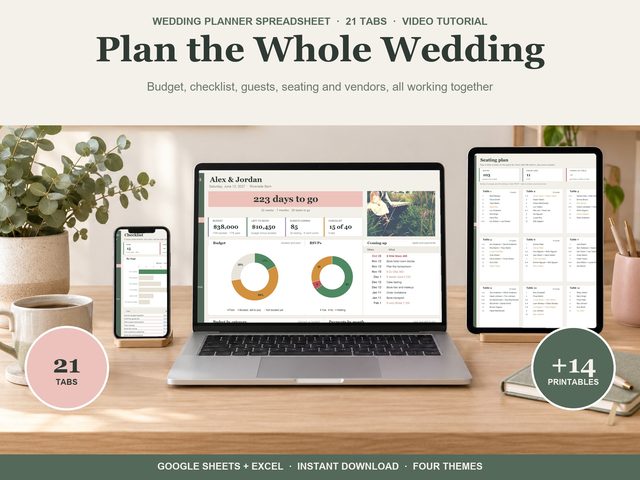
Our Wedding Planner is built this way: 21 tabs where the budget, checklist, guests, seating and vendors work together, so you type each thing once. It has a dashboard with the countdown, your photo, budget booked and paid, RSVPs and what's coming up. The checklist has 40 ready-made tasks from 12 months out to the thank-you cards, each dated from your wedding day. On Vendors, tick the one you book and its price goes to the budget. Payments shows deposits and balances with overdue in red. The guest list holds up to 1,000 guests, and typing a table number fills in the seating plan (20 tables). Venue options compares up to six venues with the total cost for your guest count, and the Food and drinks tab prices the menu per guest, per item or flat. There's also a calendar, theme board, gifts and thank-yous, a honeymoon budget, a day-of itinerary, contacts, music, a photo shot list and packing lists, plus 14 printable pages. It works in Google Sheets (free) and Excel 365.