How to organize bills so you never miss one: list them once, then let the calendar do the remembering
A simple system for keeping track of every bill: one master list, the right frequencies, a bill calendar, and what autopay won't catch.
Most missed bills aren't about money. They're about memory. The phone bill is easy, it comes every month. It's the home insurance that renews once a year, or the water bill that shows up every three months, that slips through.
The fix is a system that doesn't rely on remembering. Here's one that works.
Step 1: List every bill once
Start with one master list. Go through the last few months of bank and credit card statements and write down everything that repeats. Include the small stuff: streaming services, app subscriptions, the gym.
For each bill, note four things:
- What it is and who you pay.
- How much, or a typical amount if it changes.
- How often it comes.
- The next due date.
This is the only hard part, and you only do it once. After that, you just add new bills when they show up and remove ones you cancel.
Step 2: Get the frequency right
This is where most bill lists go wrong. Not everything is monthly, and treating everything as monthly hides the big ones.
- Weekly, every 2 weeks, every 4 weeks: often gym memberships, daycare, some loans.
- Twice a month: some rent and loan payments, on two set dates.
- Monthly: phone, internet, most utilities, insurance paid monthly.
- Quarterly: some water and utility bills, some property taxes.
- Twice a year or yearly: insurance paid in full, memberships, domain names, annual subscriptions.
Watch the difference between "every 2 weeks" and "twice a month". Every 2 weeks is 26 payments a year; twice a month is 24. That's two extra payments a year that a "monthly" budget never sees.
Here's an example list, with each bill turned into a yearly total so you can see what it really costs:
| Bill | Amount | How often | Per year |
|---|---|---|---|
| Rent | $1,800 | Monthly | $21,600 |
| Car insurance | $140 | Monthly | $1,680 |
| Internet | $80 | Monthly | $960 |
| Phone | $65 | Monthly | $780 |
| Water and sewer | $180 | Quarterly | $720 |
| Gym | $25 | Every 2 weeks | $650 |
| Home insurance | $420 | Yearly | $420 |
| Streaming | $17 | Monthly | $204 |
| Total | $27,014 |
That's about $2,251 a month on average. But no single month actually looks like that. Months with a water bill or the insurance renewal are higher, and months with three gym payments are higher too. Knowing which months are heavy is half the battle.
Step 3: Put every payment on a calendar
A list tells you what you pay. A calendar tells you when. Once every bill is on its day, a few things become obvious:
- Clusters. If rent, car insurance and the phone all land in the first week, that week needs the most money in your account.
- Paydays. Put your paydays on the same calendar. Then you can see whether a big bill lands just before payday, when the account is lowest.
- The year-at-a-glance view. Lay out the whole year and the quarterly and yearly bills stand out. That $420 insurance renewal stops being a surprise.
If a bill always lands in an awkward spot, many companies will let you change the due date. It's worth asking.
Step 4: A weekly two-minute check
Pick one day a week. Look at what's due in the next seven days, make sure the money is there, and tick off anything that's been paid. If something should have come out and didn't, you'll catch it now instead of when the late notice arrives.
Autopay helps, but it isn't a system
Autopay is great for fixed bills. But it can still go wrong, and it goes wrong quietly:
- The card on file expires or gets replaced, and the payment fails.
- The account is short on the day, and you get a bounced payment and a fee from your bank, the company, or both.
- The price goes up and nobody tells you. Autopay just pays the new amount.
- You cancel a service and it keeps charging.
- Credit card autopay set to the minimum keeps you from missing a payment, but interest still builds on the rest.
So keep autopay, and keep the list and the calendar. The weekly check is where you notice the things autopay won't tell you.
If money is tight and a bill can't be paid on time, call the company before the due date. Many will offer more time or a payment plan, but usually only if you ask first.
A bill tracker that fills itself in
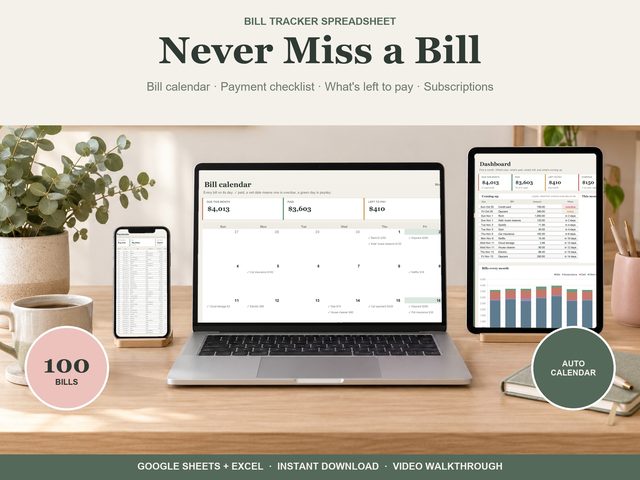
Our Bill Tracker for Google Sheets and Excel is built around this system. Add each bill once, up to 100, in your own categories, with any frequency: weekly, every 2 or 4 weeks, twice a month, monthly, quarterly, twice a year or yearly, plus start and end dates.
Every payment for the year then fills in by itself, in date order. Bills tick themselves on the day (or you tick them), and a missed one stays overdue until it's paid. The bill calendar shows every bill on its day with paydays marked and overdue days in red, the dashboard shows what's due, paid, left and coming up in the next 7 days, and the year view shows every bill month by month with monthly averages.
If you're paid every two weeks, our post on budgeting around biweekly paycheques pairs well with this.